
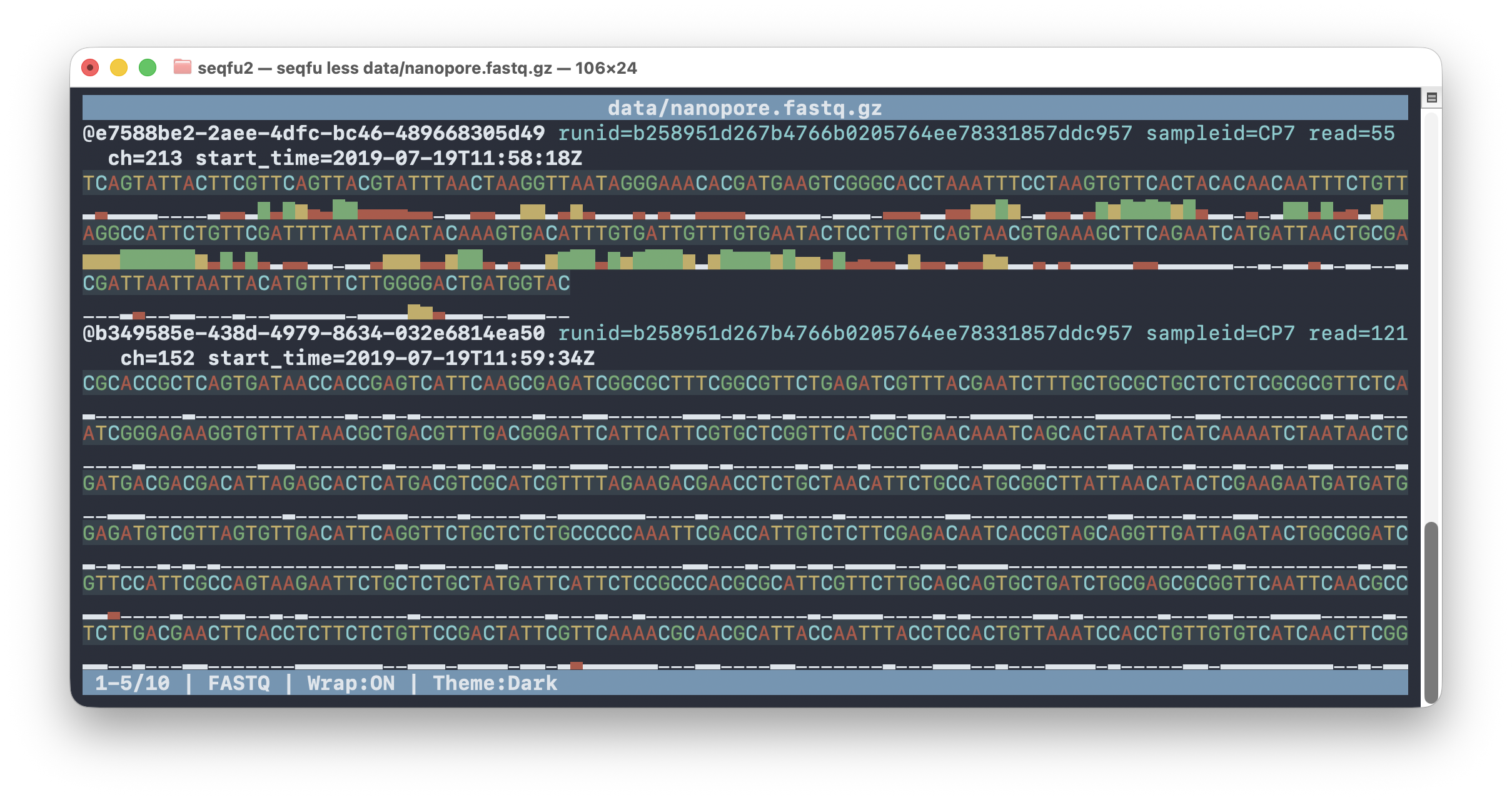
less is an interactive pager for FASTA/FASTQ files, inspired by Unix less.
It provides a full-screen terminal interface for browsing sequences with
colored bases, quality visualization, and oligo search highlighting.
Usage: less [options] <inputfile>

Interactive viewer for FASTA/FASTQ files (like Unix less for sequences).

Navigation:
  Up/Down, A/Z         Scroll one record up/down
  PgUp/PgDown          Scroll one page up/down
  Ctrl+A/Ctrl+Z        Jump 100 records up/down
  Home/End             Jump to start/end
  Left/Right           Scroll 1bp horizontally (no-wrap mode)
  L/K                  Scroll 25bp left/right
  Ctrl+L/Ctrl+K        Scroll 250bp left/right

Commands:
  /                    Search pattern (ID, comment, or oligo)
  :                    Jump to record number
  n/N                  Next/previous search match
  S                    Toggle line wrap
  T                    Cycle theme (Dark/Light/Solarized)
  R                    Toggle record numbers
  C                    Toggle compact FASTQ view
  U                    Toggle quality bars/characters
  0                    Toggle sequence base coloring
  H                    Show help
  Q, Esc               Quit

Options:
  -S, --no-line-wrap       Disable line wrapping [default: false]
  -c, --cache-size SIZE    Cache size [default: 1G]
  -m, --mouse              Enable mouse support
  -o, --oligo1 OLIGO       Highlight oligo (blue background)
  -r, --oligo2 OLIGO       Second oligo to highlight (red background)
  -q, --qual-scale STR     Quality thresholds [default: 3:15:25:28:30:35:40]
  --match-ths FLOAT        Oligo match threshold [default: 0.75]
  --min-matches INT        Oligo min matches [default: 5]
  --max-mismatches INT     Oligo max mismatches [default: 2]
  --ascii                  Use ASCII quality chars
  -Q, --qual-chars         Show quality characters instead of bars
  -n, --nocolor            Disable colors
  -h, --help               Show this help
Comparison with seqfu view
| Feature | seqfu view | seqfu less |
|---|---|---|
| Output | Prints to stdout | Interactive TUI |
| Navigation | Pipe to less -SR |
Built-in scrolling |
| Themes | Single style | 3 themes (Dark/Light/Solarized) |
| Search | Command-line only | Interactive / search |
| Line wrap | Terminal dependent | Toggle with S key |
Use seqfu view when you want to pipe output or process it further.
Use seqfu less for interactive exploration of sequence files.
Keyboard Navigation
Vertical Scrolling (Records)
| Key | Action |
|---|---|
Up, A |
Scroll up one record |
Down, Z |
Scroll down one record |
PgUp |
Scroll up one page |
PgDown |
Scroll down one page |
Ctrl+A |
Jump 100 records up |
Ctrl+Z |
Jump 100 records down |
Home |
Jump to first record |
End |
Jump to last record |
Horizontal Scrolling (No-wrap mode)
| Key | Action |
|---|---|
Left |
Scroll left 1 bp |
Right |
Scroll right 1 bp |
L |
Scroll left 25 bp |
K |
Scroll right 25 bp |
Ctrl+L |
Scroll left 250 bp |
Ctrl+K |
Scroll right 250 bp |
Search
| Key | Action |
|---|---|
/ |
Enter search mode |
: |
Jump to record number |
n |
Next search match |
Shift+N |
Previous search match |
Search modes
When you press / and enter a pattern:
-
Oligo search: If the pattern contains only IUPAC nucleotide characters (A, C, G, T, N, U, R, Y, S, W, K, M, B, D, H, V), it searches in sequences and highlights matches with a magenta background.
-
Text search: If the pattern contains other characters, it searches in sequence names and comments (case-insensitive) and highlights matches in the header.
Display Options
| Key | Action |
|---|---|
S |
Toggle line wrap ON/OFF |
T |
Cycle through themes |
R |
Toggle record numbers |
C |
Toggle compact FASTQ view (bases colored by quality) |
U |
Toggle quality bars/characters |
0 |
Toggle sequence base coloring ON/OFF |
H |
Show help screen |
Q, Esc |
Quit (or exit help) |
Line Wrap Modes
Wrap ON (default)
Sequences wrap across multiple lines. For FASTQ files, each line of sequence is immediately followed by its corresponding quality line:
@sequence_name comment
ACGTACGTACGTACGTACGT
████████████████████
ACGTACGTACGT
████████████
Wrap OFF (-S or toggle with S)
Sequences display on a single line with horizontal scrolling. Use arrow keys
or L/K to scroll left and right.
Themes
Three color themes are available, cycle through them with T:
- Dark (default): Light text on dark background
- Light: Dark text on light background
- Solarized: Solarized color palette
Color Legend
DNA Bases
| Base | Color |
|---|---|
| A | Red |
| C | Cyan |
| G | Green |
| T/U | Yellow |
| N | White/Gray |
Quality Scores
Quality scores are rendered as colored Unicode bars (or ASCII with --ascii):
- Low quality (Q < 15): Red
- Medium quality (Q 15-30): Yellow
- High quality (Q > 30): Green
Compact FASTQ View
When compact view is enabled (C), bases are colored by their quality score
instead of base identity:
- Very low quality: Gray
- Low quality: Red
- Medium quality: Yellow
- Good quality: Green
Highlighting
| Match Type | Background Color |
|---|---|
Oligo 1 (-o) |
Blue |
Oligo 2 (-r) |
Red |
| Search match | Magenta |
Examples
Basic usage
seqfu less sequences.fastq
With oligo highlighting
seqfu less -o ACGTACGT -r TGCATGCA sequences.fastq
Start without line wrap
seqfu less -S long_sequences.fasta
With mouse support
seqfu less -m sequences.fastq
Or set the environment variable:
export SEQFU_MOUSE=1
seqfu less sequences.fastq
Tips
Searching for primer binding sites
- Press
/to enter search mode - Type your primer sequence (e.g.,
ACGTACGT) - Press Enter
- Use
nandNto navigate between matches - Matches are highlighted in magenta
Quickly jumping to a specific record
- Press
:to enter jump mode - Type the record number (1-based)
- Press Enter
Finding sequences by name
- Press
/to enter search mode - Type part of the sequence name (e.g.,
sample_001) - Press Enter
- The matching text in the header will be highlighted
Unicode Support
The quality bars use Unicode block characters for graphical rendering.
If your terminal doesn’t support Unicode, use --ascii for ASCII-only output,
or --qual-chars to show the raw FASTQ quality characters.
Test Unicode support:
echo -e '\xe2\x82\xac'
If you see the Euro sign, your terminal supports Unicode.
See Also
- seqfu view - Non-interactive sequence viewer
- seqfu msa - Interactive multiple sequence alignment viewer